Earlier this week, I read the bravely titled Why I Will Never Use Microsoft Word Again by the mighty Jeff Goins. People I know say that phrase all the time out loud, but few people in positions of influence in the writing world would commit it so defiantly to screen. Yet, as soon as I read the title I was nodding, partially because I already suspected what the solution would be.
The world at large has not yet moved on from Microsoft Word and I suspect it won’t for a while yet. Submissions, anything for the day job – Microsoft Word is the only accepted choice. Even with the huge increase in popularity of Apple products there has been very little give, with an emphasis instead on better conversion technology.
But when it comes to my writing, Scrivener is my tool of choice. For those of you doing NanoWrimo this year who have never tried it, there is a free trial on their website, available for both windows and mac.
But Scrivener is not just for fiction. I think that is a common misconception. Any piece of writing that requires more than a couple of sides of A4 plain text will benefit from it’s functionality. With that in mind, here’s why I’ll be using it for NanoWrimo.
Planning Tools
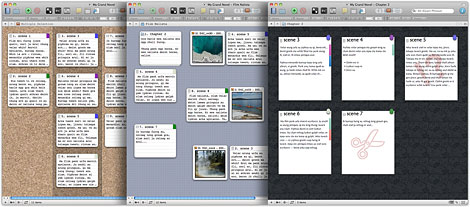
You can’t write a word of your novel itself before midnight, but there are no rules about pre-writing for Nano. In fact, I would positively encourage anyone trying it for the first time to do as much pre-writing as possible. Scrivener has the best outlining tool I’ve ever come across, and the cork board allows you to visually play with concepts, themes and characters in a way that is impossible on a piece of simple word processing software.
Name Generator
This is almost an afterthought for some people, but it has saved my bacon at 6am more than once. It’s amazing for those times when an incidental character turns up. You know the sort, the ones where you need them for a plot point but they don’t come with a back story or enough of a personality in your brain to instinctively know they are called Bob. The name generator tool can do either first names or both, with cultural, gender and language options if you need to narrow it down to something more specific. Don’t let trying to work it out derail your writing flow any longer.
Templates
Again, another key pre-writing feature that it just awesome. Scrivener comes with pre-developed templates for characters and settings, so you can keep track of the key details (nothing like your protagonist changing eye colour halfway through the book is there?). You can attach images and web content in Scrivener too, so keeping it all in one place is easy. What’s more, you can customise it so you can create your own templates. I’m trying my hand at an epic fantasy for Nano this year, so I have a template for my magic systems to make sure they balance each other out and the complicated details don’t get lost. One click and I can easily reference back, rather than having to search through an entire document to find a tiny but suddenly important detail.
Formatting and Fonts
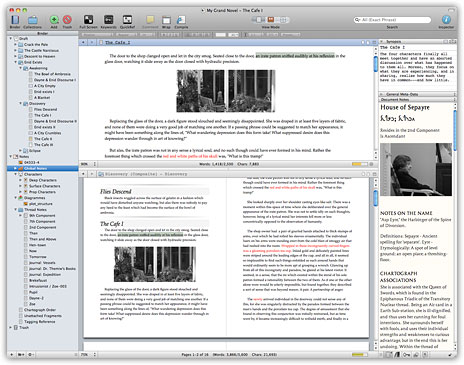
Let’s face it, Word has become more and more complex. Whilst powerful functionality is good, it gets lost in amongst the everyday, and for most people, they never use any of it anyway. When writing a long document (again, regardless of fact or fiction), the key is to get quality content in place, not to be able to provide fourteen different types of shadowing to your title. I like the fact that Scrivener places the basic, everyday options up front and centre, with much of the formatting and additional functionality happening in the background. Instead the screen is taken up with the elements you need to keep your eye on, such as the binder on the left so you can see where you are in the grand scheme of things, and the synopsis notes on the right so you can drill down into the specifics of your current chapter. I love that my screen isn’t mainly wasted space.
Project Targets
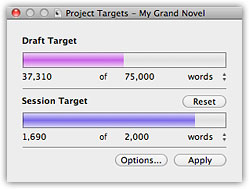
Again, a relatively small tool, but the one thing I love the most. The project target box sits happily in the corner of the screen, allowing me to see my daily word target, as well as the overall progress based on my estimates of the total length, and the countdown to deadline. The target can even dynamically change if the deadline is the key element, so if you have a day off, Scrivener reminds you that you have to put in the extra words over the life of the project. Simple, but oh so effective at 6am when you’re trying to do 1000 words before the rest of the world wakes up.

Having started this whole thing by saying that everyone still uses Microsoft Word, it would be foolish of me to push something that then had no application in the real world. I’ve written 6 full length novels in Scrivener now and exported them all successfully to either Word, ePub or Kindle formats. Likewise, if you’ve already done some of your project in a different format, you can import into Scrivener if you want to give it a go.
So that’s why I always use – and will continue to use – Scrivener for all my writing projects, not just for NanoWrimo. Check it out and let me know what you think.
All images courtesy of literatureandlatte









 Sherri Nicholds